

Agent chats
4 min read
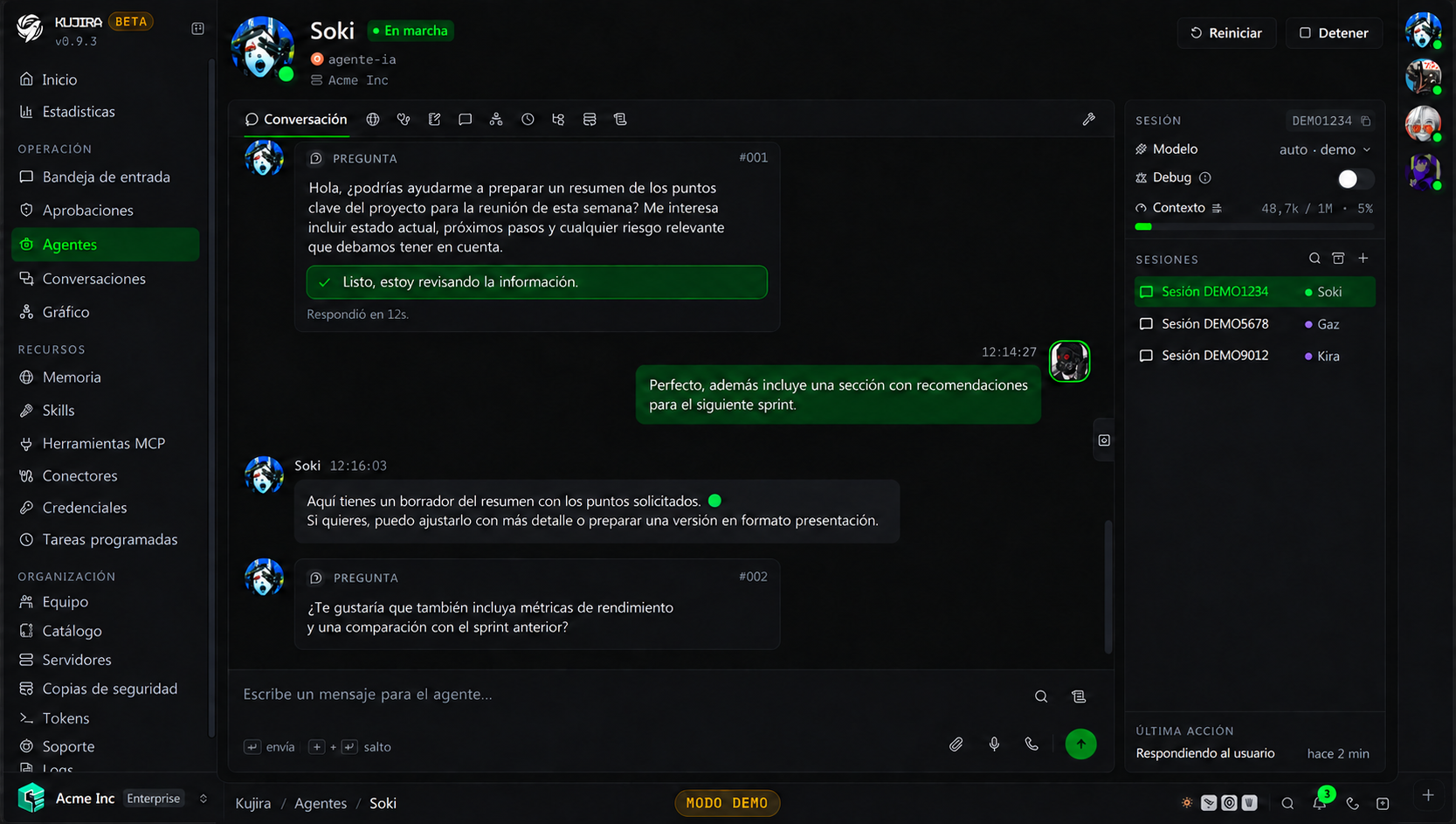
An agent's Conversation tab lets you keep several independent chats. Each session retains its own history and context, so you can handle different matters without mixing them.
Work with sessions
In the conversation sidebar, you can create a session, switch between sessions, search them, or view archived ones. The actions menu lets you change a session's name, icon, and color, archive it, or delete it.
| Option | When to use it |
|---|---|
| New session | Start a matter without carrying over another chat's context. |
| Rename | Identify conversations that you will resume later. |
| Archive | Remove a completed thread without deleting its history. |
| Delete | Only when you do not need to keep the conversation. |
Delete a session
Deleting a session removes its history. Archive it if you want to keep it for reference.
Sessions the agent manages
The agent itself can also organize its sessions while it works. It can create one to separate a matter, change its name, icon, or model, and prepare the information needed to continue work in that thread.
This is useful when a conversation becomes an independent task: the agent can open a dedicated session with the relevant context already included, without mixing it with the original thread. You can then find it, rename it, archive it, or continue the conversation from the dashboard.
The agent can also consult context from other sessions or channels when it helps complete work. That access respects your permissions: it cannot retrieve information from conversations or channels you cannot access.
Context remains independent
A new session does not automatically share all another session's history. The agent provides the context it considers necessary when creating it; from that point, every session maintains its own thread.
Settings for each conversation
A session can use a model different from the one configured for the agent and have its own context limit. Both changes apply only to that conversation.
- Change the model when the matter needs more capability or you want to control the cost of a specific task.
- Adjust the context limit when an extensive conversation should compact sooner or later.
The picker offers the models of every connection in the organization, not only those of the agent's provider. If you choose one from another provider, the conversation uses that provider's default connection; connections that carry their own model, such as OpenRouter or Ollama, appear by name. The change applies from the next message and does not restart the agent.
Choosing the connection of a conversation requires the View permission of Model providers, the same one needed to set the connection of an agent. If the agent switches model on its own, it stays within the provider of the connection you chose.
See Models to choose a provider and model, and Usage and limits to understand compaction and limits.
Messages, files, and voice
You can attach files to a message. The agent can review compatible images and documents, and receives other files in its workspace. When it finishes a task, it can return files through the same channel.
From the composer, you can record audio or start a voice call when the organization has configured this capability. The transcript is recorded in the thread; the agent adapts its response to voice and leaves links or technical content in writing in the chat.
Configure voice and audio
In Settings > Voice, add the keys for the services the organization will use:
| Service | Purpose |
|---|---|
| Groq | Transcribes audio notes and calls. |
| ElevenLabs | Generates voice replies. |
For a voice call, you need both services. Enable calls in the agent configuration and select an ElevenLabs voice. If audio is not understood, first check transcription setup.
Debug with support
You can authorize Kujira support to review one specific internal chat from the session list. This authorization is limited to that thread, expires after 24 hours, and is not included in general temporary support access.
Keep one goal per session
Use one session for each customer, project, or problem. More focused history helps the agent stay on track and makes it easier to resume work later.