

Activity log
2 min read
The organization's ledger: every sensitive action is recorded—who revealed a password, which agent used it, who changed a role, or who deleted an agent. It appears in the menu as Logs.
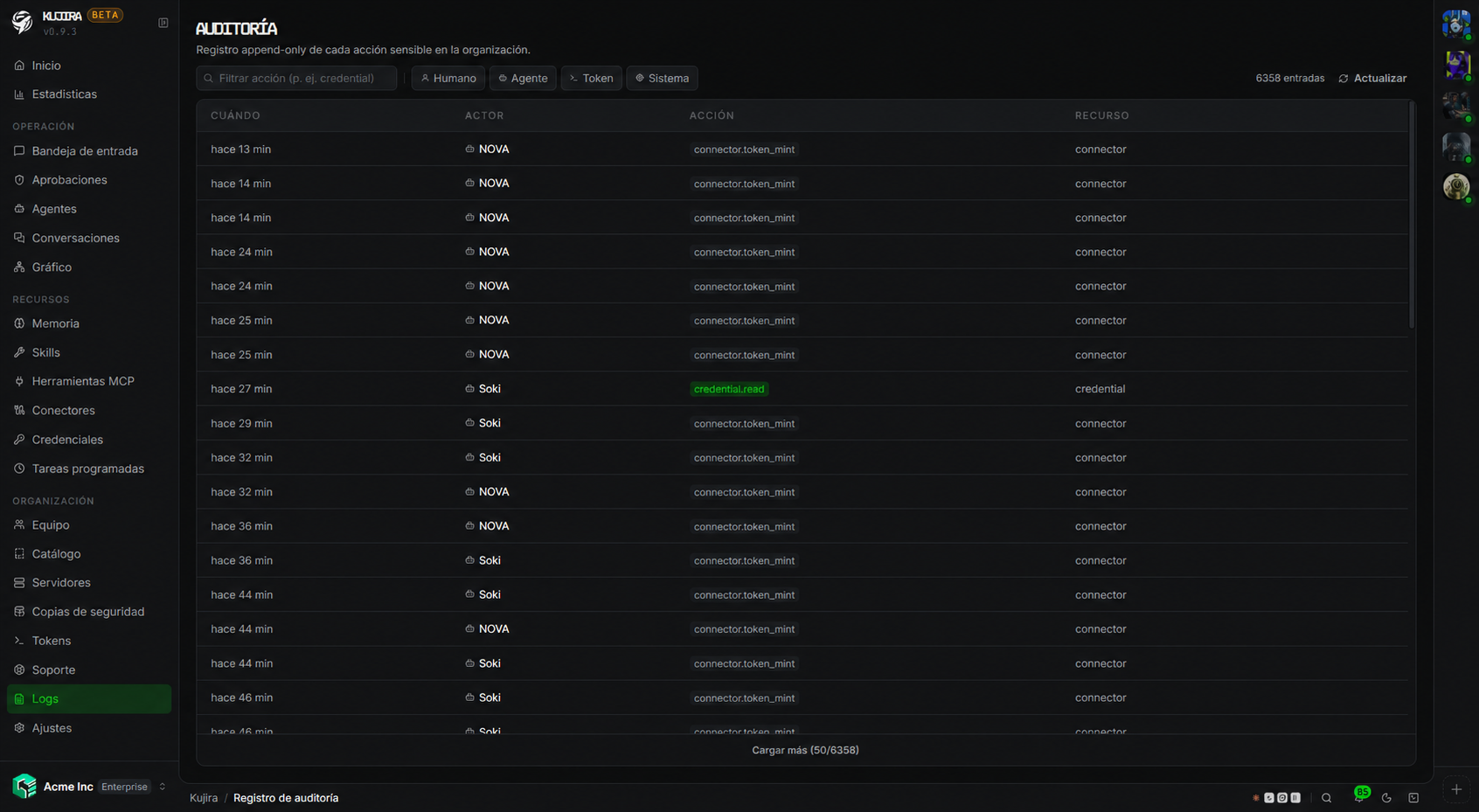
- It cannot be deleted or altered. It is append-only.
- You can filter and search by action and view every entry's details: when, who, which resource, and the outcome.
- For security, it never stores secrets themselves, only that they were used.
Analyze it with an agent
You can also query the log through the API. Create a service token with the audit.view permission and give it to a Kujira agent or an external analysis tool. It can read and filter entries to explain what happened, find a sequence of changes, or summarize activity for a period.
For example, ask it: “review this week's credential changes and tell me which require attention” or “explain what this agent did before the service failed”.
An audit token remains sensitive
Assign only audit.view: it gives access to operational information across the organization, even though it cannot modify it. You can restrict the token to specific IPs, give it an expiry date, and revoke it at any time from Organization > Tokens.
Who did what
Each entry identifies its author type:
- A person on your team.
- An agent.
- A service token—an integration. See Service tokens.
- The system.
This prevents an action from an integration being confused with one by a person.
Support is included too
If you grant support access, what we do appears here just like actions from any member of your team.
This is where you look when you need to know “what happened here, and who did it?”.